Re: Nabble Editor line wrapping
Posted by DaveC49 on
URL: https://support.nabble.com/Nabble-Editor-line-wrapping-tp7601337p7601342.html
 GnuCash - Reply - Google Chrome_008.png (230K) Download Attachment
attachment1 (302K) Download Attachment
URL: https://support.nabble.com/Nabble-Editor-line-wrapping-tp7601337p7601342.html
Hi Greg,
Thanks . I do appreciate that web stuff generally tries to be adaptable to the device screen size. It's just that the posts to the GnuCash Forum Nabble site are limited to a framework ~75 chars wide (I am viewing it on a 1920 x 1820 22 inch monitor and it barely occupies 1/3 of the scrren width so it is not totally scaleable) . I suspect that has been set somehow because the main mailing lists are managed using Gnu Mailman and are echoed to the Nabble version of the forum rather than the forum being native on Nabble. Something in the system is set back at the days when monitors could only cope with 80 chars. I grew up with that, so it isn't totally alien to me. I was hoping there was something like a user preference I could set so I was able to restrict the editor so it would match what was probably the size of a VGA monitor a couple of decades ago. My text editor which is used by my mail client as a mail editor can do that and it is convenient for preparing posts to the forum to have it set to limit line lengths to ~74 chars. I know we don't work with punched cards anymore ( that was the origin of the 74 chars as the IBM cards were 80 chars wide and a number of columns were reserved for line numbers and one for continuation card). The attached screenshost illustrates what Iam trying to address for this specific forum. It is just a convenience really.
Cheers
David
On Tue, 2018-09-04 at 01:01 -0700, GregChapman [via Nabble Support] wrote:
Hi David,
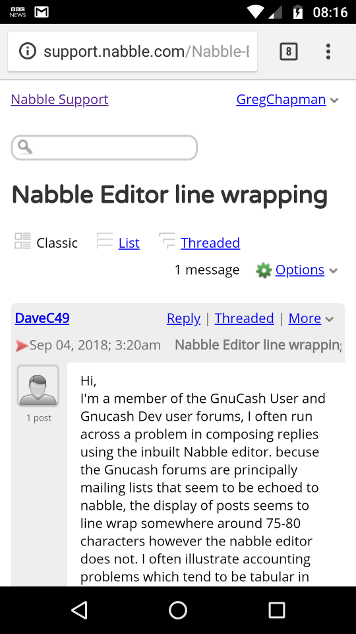
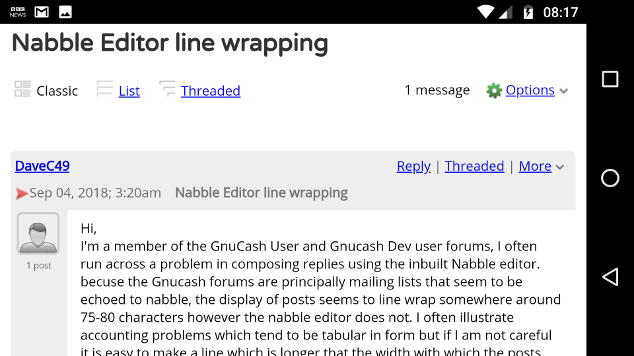
I think that you may have missed a fundamental point about the web. How a "document" (that includes pages on a forum) is rendered depends on the equipment and settings used by the recipient. Here's you message displayed on my phone:
Note how the text wraps at about 36 characters when in portrait mode but there's considerably more room when in landscape mode. Note that I'm only seeing the text that way because of the font and font size that is set in my phone's browser (I can change them if I wish but if I changed them to show 75 characters per line the text would become too small to read). And, of course, it will be rendered in a different font and at a different size on my desktop. Not only that, for anyone using a laptop or desktop computer, there will be an almost infinite number of widths at which someone can set their window size and this will affect the point at which text wraps.
In short, do not expect anyone else to see things the way you do. Some won't even see the screen they'll hear it. The blind will use screen reader software as do car drivers who manage their email using voice activation software, dictating replies on the move.
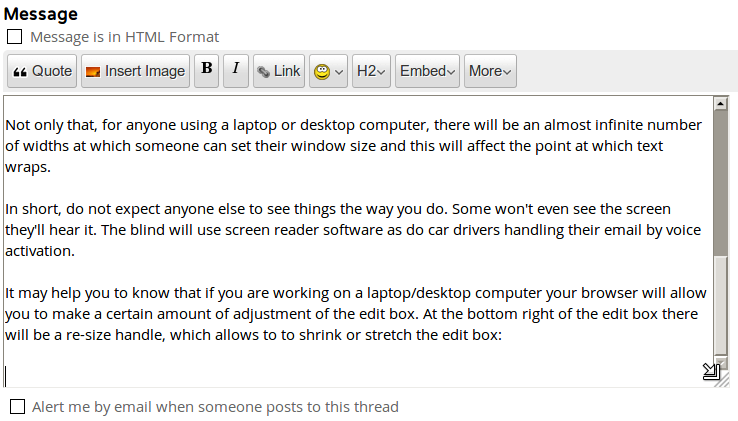
It may help you to know that if you are working on a laptop/desktop computer your browser will allow you to make a certain amount of adjustment of the edit box. At the bottom right below the scrollbar there will be a re-size handle, which allows to to shrink or stretch the edit box both vertically and horizontally:
If it is impossible to demonstrate your point without a fixed width, and I accept that might be necessary if the output of GnuCash is expected always to be printed, then it may be best to prepare a PDF file and attach that to your posts on Nabble.
Another possible approach would be to take a screenshot and upload that portion of your message as an image - but that might either lead to the image being shrunk to the width of the users screen, making things illegible, or require awkward horizontal scrolling of the screen. (Note that, on Nabble, the scrollbar will appear at the bottom of the post and not immediately under the over-sized image, and it is easy for those using Nabble to miss it!)Just a Volunteer Nabble Helper - because the nice folk at Nabble have helped me!
GregHelp - Building a set of answers to Nabble FAQs.
If you reply to this email, your message will be added to the discussion below:http://support.nabble.com/Nabble-Editor-line-wrapping-tp7601337p7601338.html
 GnuCash - Reply - Google Chrome_008.png (230K) Download Attachment attachment1 (302K) Download Attachment
| Free forum by Nabble | Edit this page |