Re: BUG: "Small" Avatars Not Showing
Posted by GregChapman on
URL: https://support.nabble.com/BUG-Small-Avatars-Not-Showing-tp7600532p7600673.html
I don't think you have actually looked at the forum indicated in the opening post of this topic. Here's what I see in a typical post, first where the window is maximised:
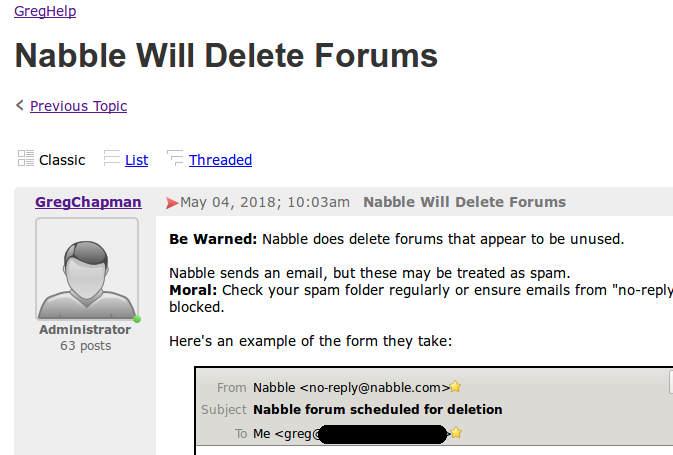
Next one where the window has limited width to simulate the screen seen on mobile devices.
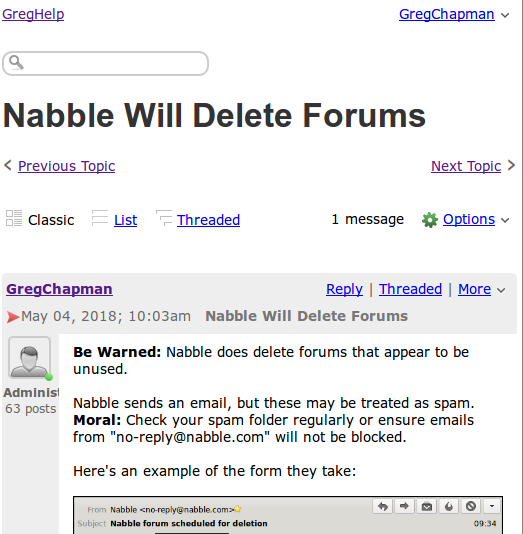
Here's the relevant code behind this post:
http://greghelp.991552.n3.nabble.com/Nabble-Will-Delete-Forums-td4012788.html
================================================
And now the type of message header bar I expect to see with "Picture Size" set to small - again shown in two widths:
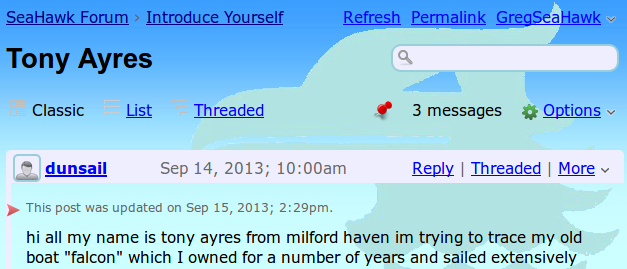
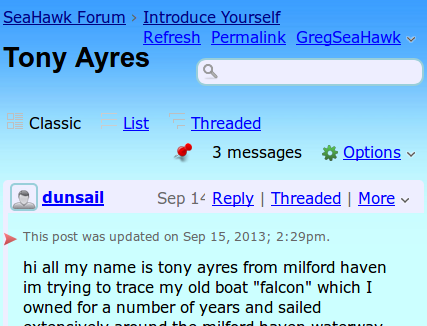
Look at the code behind this a forum also on the n3 server, and which also has Avatars set small :
http://seahawk-forum.968426.n3.nabble.com/Tony-Ayres-td4024078.html
================================================
Note that both display the file "avatar100.png" but one is limited to 24px width and height and the other is set to 100px width and height - not to mention that the structure in which each is found is utterly different, reflecting the fact that GregHelp has not picked up the "Classic topic page - Picture size" option correctly while the SeaHawk forum has.
URL: https://support.nabble.com/BUG-Small-Avatars-Not-Showing-tp7600532p7600673.html
I don't think you have actually looked at the forum indicated in the opening post of this topic. Here's what I see in a typical post, first where the window is maximised:
Next one where the window has limited width to simulate the screen seen on mobile devices.
Here's the relevant code behind this post:
http://greghelp.991552.n3.nabble.com/Nabble-Will-Delete-Forums-td4012788.html
================================================
<div class="avatar-inner"> <a href="http://greghelp.991552.n3.nabble.com/template/NamlServlet.jtp?macro=user_nodes&user=353306" rel="nofollow" title="View profile of GregChapman" class="nowrap no-decoration"><img class="avatar medium-border-color" src="http://n3.nabble.com/images/avatar100.png" height="100" width="100" alt="GregChapman" title="GregChapman"/><img src="/images/online.png" class="online353306 online invisible" title="User is online" alt="online"/></a> </div>================================================
And now the type of message header bar I expect to see with "Picture Size" set to small - again shown in two widths:
Look at the code behind this a forum also on the n3 server, and which also has Avatars set small :
http://seahawk-forum.968426.n3.nabble.com/Tony-Ayres-td4024078.html
================================================
<table class="classic-author-name"> <tr> <td class="avatar"><a href="http://seahawk-forum.968426.n3.nabble.com/template/NamlServlet.jtp?macro=user_nodes&user=495359" rel="nofollow" title="View profile of dunsail" class="nowrap no-decoration"><img class="avatar medium-border-color" src="http://n3.nabble.com/images/avatar100.png" height="24" width="24" alt="dunsail" title="dunsail"/><img src="/images/online.png" class="online495359 online invisible" title="User is online" alt="online"/></a> </td> <td class="bold nowrap"><a href="http://seahawk-forum.968426.n3.nabble.com/template/NamlServlet.jtp?macro=user_nodes&user=495359" class="owner-link">dunsail</a></td> </tr> </table>================================================
Note that both display the file "avatar100.png" but one is limited to 24px width and height and the other is set to 100px width and height - not to mention that the structure in which each is found is utterly different, reflecting the fact that GregHelp has not picked up the "Classic topic page - Picture size" option correctly while the SeaHawk forum has.
Volunteer Helper - but recommending that users move off the platform!
Once the admin for GregHelp now deleted.
Once the admin for GregHelp now deleted.
| Free forum by Nabble | Edit this page |