Re: Transparent background
Posted by GregChapman on
URL: https://support.nabble.com/Transparent-background-tp7598358p7598373.html
As Franklin says, it looks like a solid colour to me. I think I have discovered how the code in your forum is generated.
When I look at your code behind your forum there's a file:
http://forum.12634.n8.nabble.com/template/NamlServlet.jtp?macro=site_style
and it contains:
On a site of mine I have a similar file:
http://seahawk-forum.968426.n3.nabble.com/template/NamlServlet.jtp?macro=site_style
which contains:
My single first line is clearly generated through what I have under the FONT item here:
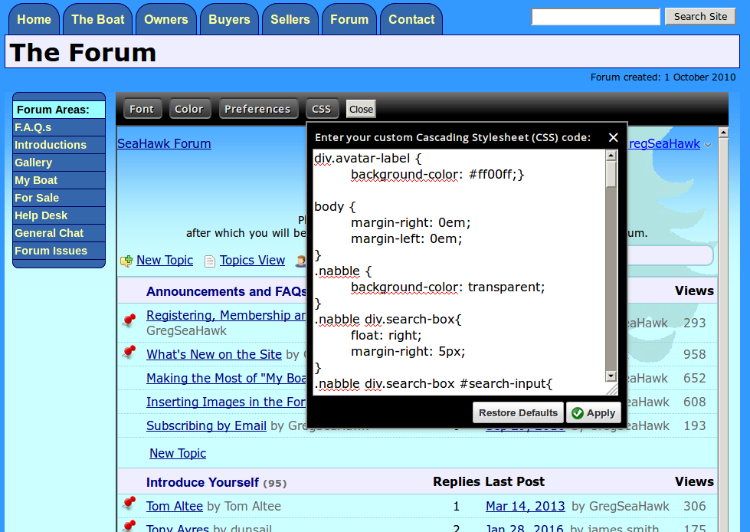
I am as confident as I can be when I set up the forum seven years ago that I made no changes under the COLOR item.
The long second line is clearly generated by the code found under CSS.
(You can see how my main site includes both a graduated blue background to the page plus a SeaHawk logo background image over part of the page)
From all of this I would guess that you need to take all the customisations you have made under the COLOR item and shift them to the CSS box - except for the line that contains:
Franklin may be able to confirm this.
Having said all this, I do worry that your background is somewhat high contrast and complex and it will make any text very difficult to read unless you have such contrasting colours that it will spoil the predominately red/black design.
URL: https://support.nabble.com/Transparent-background-tp7598358p7598373.html
As Franklin says, it looks like a solid colour to me. I think I have discovered how the code in your forum is generated.
When I look at your code behind your forum there's a file:
http://forum.12634.n8.nabble.com/template/NamlServlet.jtp?macro=site_style
and it contains:
html,#nabble,.nabble .no-bg-color { background-color: #820000; }
.nabble .light-bg-color { background-color: #02A112; }
.nabble .shaded-bg-color { background-color: #A10000; }
.nabble * { color: #FFFFFF; }
.nabble h1, .nabble h2, .nabble h3, .nabble h4, .nabble h5, .nabble h6 { color: #FFFFFF; }
.nabble a:link, .nabble a.not-visited-link { color: #0000FF; }
.nabble a:visited, .nabble a.visited-link { color: #FFFFFF; }
.nabble select, .nabble input, .nabble textarea { background-color: #121212; }

			#nabble { background-color: transparent; }
As you see there is some conflict in that code with two different background-color statements
On a site of mine I have a similar file:
http://seahawk-forum.968426.n3.nabble.com/template/NamlServlet.jtp?macro=site_style
which contains:
body, input, button, textarea, select { font-size: 95%; }

			div.avatar-label { background-color: #ff00ff;} body { margin-right: 0em; margin-left: 0em; } .nabble { background-color: transparent; } .nabble div.search-box{ float: right; margin-right: 5px; } .nabble div.search-box #search-input{ background-color: #eeeeff; } .nabble a:link,.nabble a.not-visited-link, span.dropdown-item{ color: #0000ff; } .nabble a:visited,.nabble a.visited-link { color: #000080; } .nabble h1, .nabble h2 { color: #000000; } .nabble .light-black { color: #124850; } .nabble .message-text, .small, .nabble .editor-table td, p, form, small, ul, table td, .breadcrumbs { color:#000000; } .nabble .light-bg-color { background-color: #EDF7F9; } .nabble .shaded-bg-color { background-color: #EEEEFF; } .nabble th, .nabble .dark-bg-color { background-color: #C2E5EB; } .nabble .light-highlight { background-color: #ADF3DF; } .nabble .highlight { background-color: #94E4CD; } .nabble .info-message th, .nabble .dark-highlight { background-color: #7FD6BC; } .nabble table, .nabble li, .nabble div, .nabble .medium-border-color { border-color: #99CFDA; } .nabble td, .nabble .light-border-color { border-color: #C4E2F5; } .nabble .dark-border-color { border-color: #8CC3CD; } .nabble .error-message { border-color: #ffcc33; } .nabble .info-message { border-color: #3366ff; } span.dropdown table { background-color:#F1F9FA; border-color:#8CC3CD; } tr.dropdown-hover { background-color:#DAEEF1; } .post-border, td.post-border { border-color: #d9d9d9; } span.post-author { color:#000000; } .post-hover { background-color:#E4F6F9; } select, input, textarea, button { border:1px solid #337984; } input[type=radio] { border:none; } .classic-author-name { font-size: 90%; }
My single first line is clearly generated through what I have under the FONT item here:
I am as confident as I can be when I set up the forum seven years ago that I made no changes under the COLOR item.
The long second line is clearly generated by the code found under CSS.
(You can see how my main site includes both a graduated blue background to the page plus a SeaHawk logo background image over part of the page)
From all of this I would guess that you need to take all the customisations you have made under the COLOR item and shift them to the CSS box - except for the line that contains:
html,#nabble,.nabble .no-bg-color { background-color: #820000; }and then use the "Restore Defaults" button under the COLOR item.
Franklin may be able to confirm this.
Having said all this, I do worry that your background is somewhat high contrast and complex and it will make any text very difficult to read unless you have such contrasting colours that it will spoil the predominately red/black design.
Volunteer Helper - but recommending that users move off the platform!
Once the admin for GregHelp now deleted.
Once the admin for GregHelp now deleted.
| Free forum by Nabble | Edit this page |